# Quick start: Install and sign in
::: tip Prototyping a frontend first? No Docker required
If you only need an interactive, multi-role mock frontend on your machine, you only need **Git, Node 22, and pnpm 10**. Start from `kaiwu-web-starter` by following [Product-first frontend & adoption](https://kaiwu.shengzhiweilai.online/en/after-generation#product-first) and the [zero-platform prompt](https://kaiwu.shengzhiweilai.online/en/ai-development#product-prompt-section). To run the full platform and backend stack, continue below.
:::
::: tip Fastest way: Let your AI coding agent run it
If you use Claude Code, Codex, Cursor, or another terminal-capable coding agent, [copy the setup prompt](https://kaiwu.shengzhiweilai.online/en/ai-development) to let it verify your environment, start Kaiwu, and scaffold your first project.
:::
## 1. Prerequisites
Ensure you have **Git**, **Docker (with Compose v2)**, **OpenSSL**, and **curl** installed locally.
## 2. Clone and start Kaiwu (v0.3.0)
```bash
git clone --branch v0.3.0 --depth 1 https://github.com/kaiwuzaidao/kaiwu.git
cd kaiwu
./kaiwu doctor
KAIWU_DB_TYPE=mysql ./kaiwu up
```
> Prefer Gitee? Replace the URL with `https://gitee.com/wujm12138/kaiwu.git`. `./kaiwu up` checks out the runtime repositories, starts a local MySQL instance, runs migrations, and launches the platform.
Environment notes (Colima / Source build / Existing DB)
- **Colima users**: Clone into a directory shared with the VM so containers can read bind-mounted files.
- **Images & source builds**: Release tags pull `amd64 / arm64` images from GHCR and fall back to building from source if pulling fails. Pass `--build` to force a source build.
- **Existing MySQL / DM8 or parallel stacks**: See [Operations & troubleshooting](https://kaiwu.shengzhiweilai.online/en/operations).
## 3. Sign in and verify
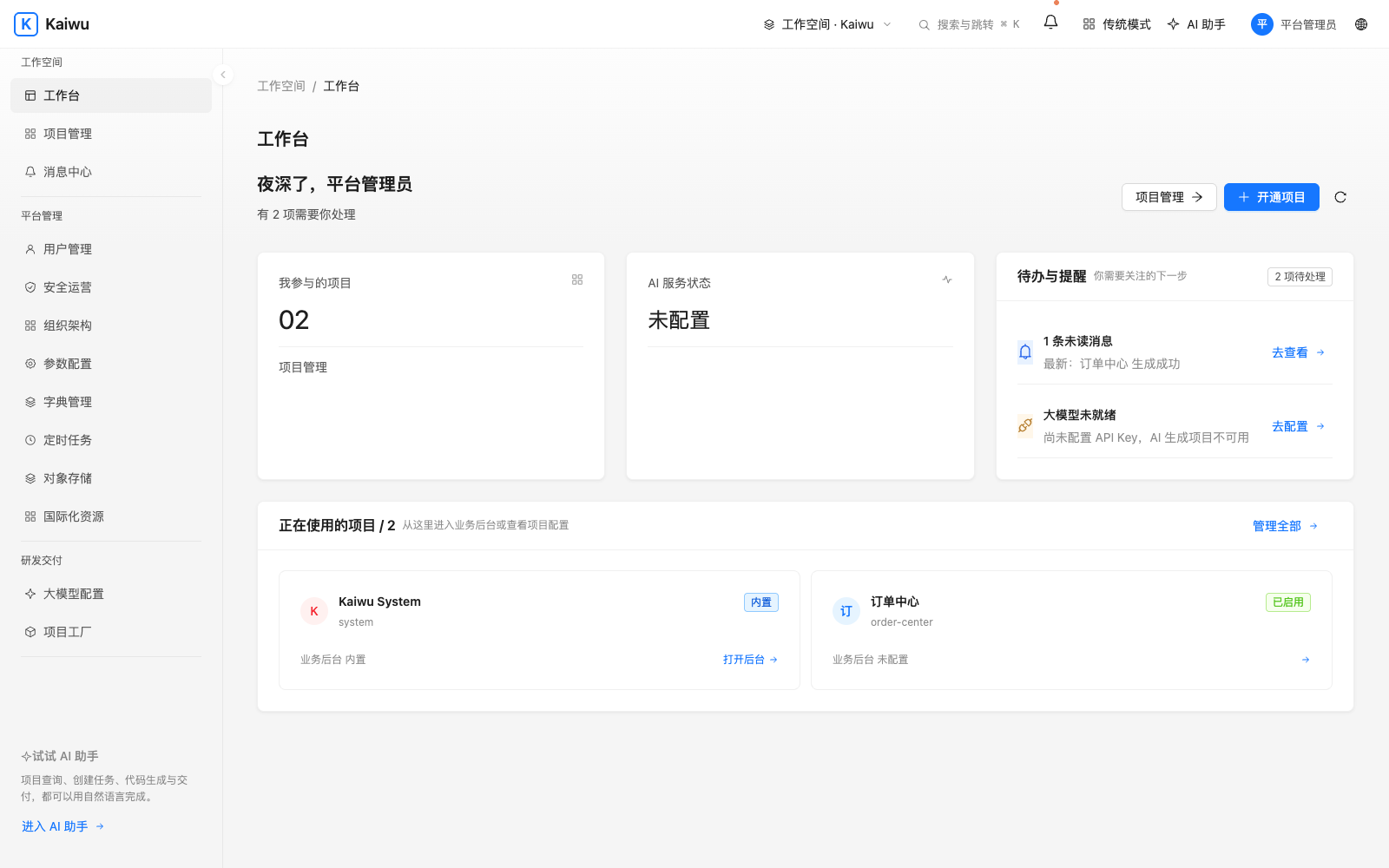
Open **** in your browser:
1. Sign in as `admin` using the random initial password printed in your terminal, then change it when prompted.
2. Need to see the initial password again? Run `./kaiwu credentials` inside the `kaiwu` directory (once changed, use your new password).
3. Verify the platform health at any time:
```bash
./kaiwu status
curl -fsS http://127.0.0.1:8088/actuator/health
```
Run `./kaiwu down` to stop the stack; running `./kaiwu up` again in the same directory reuses your existing data volumes.
## Next steps
- [Generate and run your first business project →](https://kaiwu.shengzhiweilai.online/en/after-generation)
- [How Kaiwu works in 10 minutes →](https://kaiwu.shengzhiweilai.online/en/how-it-works)
- [Operations & troubleshooting →](https://kaiwu.shengzhiweilai.online/en/operations) · [Release walkthrough][quickstart]
# Generate and run a project
Kaiwu supports two starting paths: **Path 1** lets product teams build an interactive mock frontend first and adopt it into the platform to generate the companion backend; **Path 2** creates both repositories together through Project Factory after the platform is running.
## Path 1: Product-first frontend, then adopt to generate the backend {#product-first}
From the `kaiwu-web-starter` root directory (requires Git, Node 22, and pnpm 10—no running platform needed), initialize a clean repo or append `--example booking` to try the two-user equipment booking demo:
```bash
node scripts/kaiwu-init.mjs --code equipment-booking --name "Equipment Booking"
cd ../equipment-booking-web
pnpm install --frozen-lockfile
pnpm dev
```
Open the printed URL at `/__mock/` to switch personas and verify screens, rules, and scenarios. Once accepted on `product` and handed off via MR, an engineer signs in to the entry repository and runs `project adopt`:
```bash
./kaiwu login --client "project-development"
./kaiwu project adopt ../equipment-booking-web
./kaiwu project adopt ../equipment-booking-web --apply
```
- Without `--apply`, the command previews the project registration, manifests, and initial roles without writing anything. With `--apply`, it registers the project, imports manifests and `roles.yml`, and generates the companion backend in `../equipment-booking-service` (shown in Project Factory as `ADOPT_FRONTEND`).
- Use `./kaiwu project sync ../equipment-booking-web` for subsequent manifest updates (preserving manual platform role edits unless `--with-access` is passed). Projects using the optional Workflow service can also preview flow imports with `./kaiwu workflow sync ../equipment-booking-web`. [Frontend adoption ADR][adopt]
## Path 2: Create and pull both repositories from the platform
Sign in with an account that can create projects. In Project Management, choose Create project and enter its name and code, or run the CLI from the entry repository and approve the device request in your browser:
```bash
./kaiwu login --client "project-development"
./kaiwu whoami
./kaiwu project new order-center --name "Order Center" --package com.example.ordercenter
./kaiwu project status order-center --wait
./kaiwu project pull order-center
./kaiwu project-up ../business/order-center-service ../business/order-center-web
```
Local bootstrap accounts also support `login --local`. If the password has changed or local approval fails, follow the device link. If `order-center` already exists, start with the status command. Each code gets one successful generation, and its artifacts remain available for download.
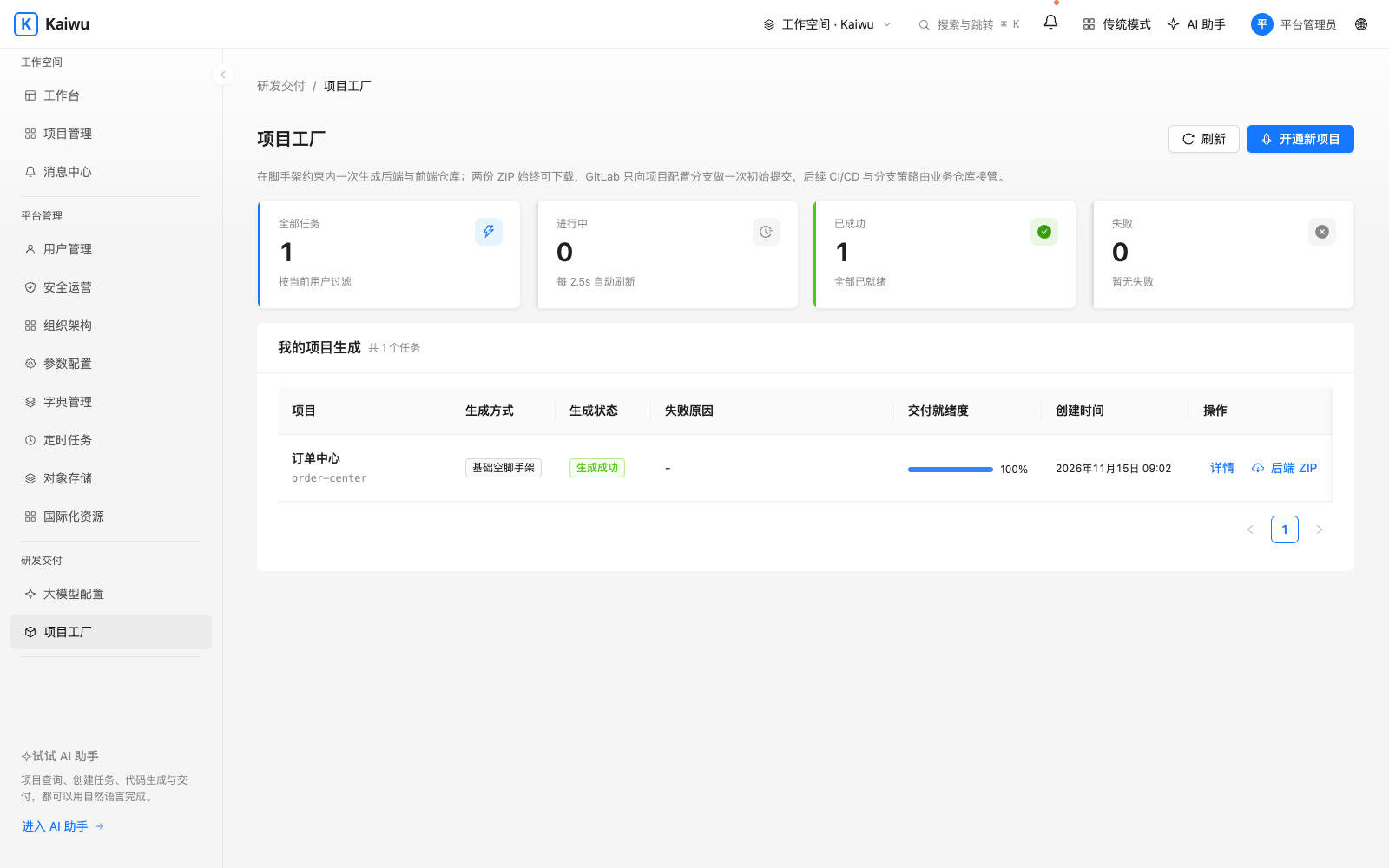
Known issue in v0.2.0: generated applications can restart repeatedly if packaged resources are missing or the frontend cannot read its configuration. Even if the startup command succeeds, open the application from the workbench and verify a request. Check the business containers’ status and logs if it fails. [Startup fix](https://github.com/kaiwuzaidao/kaiwu-system-service/pull/1)
## Check the handoff
- `../business/order-center-service/pom.xml` and `../business/order-center-web/package.json` (or the adopted `../equipment-booking-service` and `../equipment-booking-web`) belong to separate Git repositories.
- `project-up` builds both services and connects local routes. Open the app from the workbench at `/apps//`. Its API uses `/-api/`.
- If a member cannot open the app, check its entry URL, membership and role, then consult Gateway logs.
- Stop the business stack with `./kaiwu project-down `. Continue development in its two source repositories.
[Develop a business feature](https://kaiwu.shengzhiweilai.online/en/business) · [Project factory contract][factory]
## Open the frontend during development
Both `kaiwu-web-starter` projects and Project Factory frontends provide two local dev modes:
- **Local mock demo (`pnpm dev`)**: Enables the built-in Umi mock runtime by default. Open `/__mock/` to switch personas, exercise in-memory CRUD flows, and reset demo state. Unregistered paths fail closed with 501, and mock files never enter production builds.
- **Real Gateway integration (`pnpm dev:real`)**: Proxies `/api`, `/{code}-api`, and `/{code}-svc` to Gateway (`http://127.0.0.1:8088` by default, configurable via `KAIWU_GATEWAY`). Pass a real `projectId` and enter from the same-origin workbench so the session bridge delivers a short-lived token (or bootstrap an in-memory token for standalone debugging). Each repository owns its own branches, reviews, and releases.
# Develop a business feature
Using an order list or equipment booking as an example, start by reading each repository’s `AGENTS.md`, `README.md`, and `docs/kaiwu-project-blueprint.json`. Use JDK 21 for the backend and the pnpm version pinned in `package.json` for the frontend.
| Area | Responsibility & conventions |
| --- | --- |
| Backend `api` module | Define query and write DTOs plus paginated responses. Carry long business IDs as strings in the frontend and JSON. |
| `domain` module | Implement entities, mappers, services, and controllers. Bound page sizes and enforce `@RequirePermission`. |
| `boot`, DB & `sql/schema.sql` | Append the next Flyway migration in the business backend and update `sql/schema.sql`. The platform DB is separate. |
| Platform manifests `kaiwu/*.yml` | Dual-repo scaffolds store manifests under backend `kaiwu/`; product-led projects (`project adopt`) maintain them under frontend `kaiwu/` (referenced by the backend via `kaiwu/frontend-manifests`). Permission codes (e.g., `order:order:list`) must match across UI, `menus.yml`, and backend `@RequirePermission`. |
| Frontend layer `@/kaiwu` & UI | Pages import `rootContainer`, `useCan` / ``, `useDict`, `useProjectConfig`, `kaiwuRequest`, and `useKaiwuSession` from `@/kaiwu`. You can swap out the UI component library while keeping `src/kaiwu/` intact. Store stable status values and resolve labels via managed dictionaries. |
| Rules, scenarios & contract | Register new module `permissionPrefix` entries in `docs/kaiwu-project-blueprint.json`; link rule IDs across `docs/business-rules.md`, `mock-support/`, `docs/acceptance-scenarios.md`, and `tests/scenarios.test.mjs`. |
## Verify the feature
**Product mock stage** (runs standalone in the frontend repository):
```bash
pnpm verify:mock
pnpm test:scenarios
pnpm test:browser
```
**Real backend integration** (pass `KAIWU_SERVICE_DIR` / `KAIWU_FRONTEND_DIR` when repos are not siblings, and pass whichever repo owns `kaiwu/*.yml` to `project sync`):
```bash
(cd ../business/order-center-service && bash scripts/verify.sh)
(cd ../business/order-center-web && corepack pnpm install --frozen-lockfile && KAIWU_SERVICE_DIR=../business/order-center-service corepack pnpm verify)
./kaiwu project sync ../business/order-center-service
```
- Grant permissions in the project permission center (or inspect initial `roles.yml` imported by `project adopt`), run `pnpm dev:real`, and open the app through the same-origin workbench.
- Test both authorized and unauthorized users (and separate owners for row-scoped records), including direct API calls.
- Before release, `pnpm build` runs `check-dist.mjs` to block mock markers from `dist/`, and `sh scripts/check-runtime-image.sh "$IMAGE" ` verifies the production container serves the built index and returns 404 for `/__mock/`. [Roles and row filtering](https://kaiwu.shengzhiweilai.online/en/access)
## Hand off a working frontend {#product-handoff}
Whether starting from `kaiwu-web-starter` or the [project factory](https://kaiwu.shengzhiweilai.online/en/after-generation), product and engineering work in the same frontend repository—eliminating static wireframes and duplicate frontend rewrites:
1. **Product & AI build on `product`.** Build working screens, `src/services/` TypeScript contracts, and `mock-support/` handlers; run `pnpm dev` and use `/__mock/` to test across personas. Record numbered rules in `docs/business-rules.md` and happy, error, and unauthorized cases in `docs/acceptance-scenarios.md`.
2. **Handoff via `handoff/` MR.** Once `pnpm verify:mock`, `pnpm test:scenarios`, and `pnpm test:browser` pass, cut a snapshot branch `handoff/` and open an MR to `dev` using `.gitlab/merge_request_templates/Product-Handoff.md`, freeing `product` for the next batch.
3. **Adopt & implement the backend.** If not yet registered, run `./kaiwu project adopt --apply` to register the frontend, sync initial manifests/roles, and generate the companion Spring Boot repo; implement APIs, `@RequirePermission`, concurrency control, and data scopes.
4. **Wire `pnpm dev:real` and ship.** Keep approved UX and layouts intact while aligning payloads, error messages, and loading/empty states. Re-verify with `pnpm verify` and `pnpm dev:real`, promote to `main`, and merge release fixes back into `product`.
# Work with a coding agent
Both product managers and engineers can start with a single prompt: product teams build interactive mock screens directly in a standalone frontend repository, and engineers take over that exact frontend, adopt it into Kaiwu, and wire the Spring Boot backend.
## Product-first mock demo: one prompt without running the platform {#product-prompt-section}
If you want an interactive, multi-role frontend demo on your machine without installing Docker, MySQL, JDK, or the Kaiwu platform first, make sure Git, Node 22, and pnpm 10 are installed, then hand this prompt to your coding agent from an empty directory (open-source starter repo: [`kaiwu-web-starter`](https://github.com/kaiwuzaidao/kaiwu-web-starter)):
```text
Get the latest stable release of the Kaiwu frontend starter from https://github.com/kaiwuzaidao/kaiwu-web-starter (for example v0.3.0) and follow its AGENTS.md to initialize my project. Build an equipment booking frontend: employees can view free slots for a meeting-room projector, book a slot, or cancel their own booking, and two users booking overlapping slots see a clear conflict message. Run it with built-in mocks and give me the local clickable URL.
```
The agent clones the starter repo, follows its `AGENTS.md` to initialize your project (or pass `--example booking` for the ready-made two-user booking demo), builds the pages, `src/services/` TypeScript contracts, `mock-support/` handlers, business rules, and scenarios, then runs `pnpm dev` and gives you the local `/__mock/` persona-switcher URL. Once reviewed on the `product` branch, the agent creates a `handoff/` branch and opens an MR to `dev`.
## Start the platform from an empty directory
If you want to launch the full Kaiwu platform and scaffold both backend and frontend repositories together, copy this prompt into a coding agent with access to your local terminal:
```text
Get the latest stable Kaiwu release from https://github.com/kaiwuzaidao/kaiwu and follow AGENTS.md to start it locally. Ask what I want to build, then set up its backend and frontend.
```
## Develop a feature in an existing project
Open the project's frontend and backend repositories (or an accepted product frontend repo) in your coding agent and give it this prompt:
```text
Read the project's AGENTS.md and ask what feature I want. Then implement and test it.
```
See [Installation and first login](https://kaiwu.shengzhiweilai.online/en/start) for setup, or [Generate and run a project](https://kaiwu.shengzhiweilai.online/en/after-generation) for both starter onboarding and platform generation. Agents can also read the [documentation index](https://kaiwu.shengzhiweilai.online/en/llms.txt) or [full handbook](https://kaiwu.shengzhiweilai.online/en/llms-full.txt).
## Three contracts to check before taking over
| Area | Where to edit and how it is verified |
| --- | --- |
| **Headless integration & swappable UI** | Pages import `rootContainer`, `useCan`, ``, `useDict`, `useProjectConfig`, `kaiwuRequest`, and `useKaiwuSession` from `@/kaiwu`, with APIs under `src/services/`. You can replace the UI library while keeping `src/kaiwu/` intact (`check:product` checks its SHA-256 lock). |
| **Matching permission codes & manifests** | Register new module prefixes in `docs/kaiwu-project-blueprint.json`. Product-led projects maintain `menus.yml`, `dicts.yml`, `configs.yml`, and `roles.yml` under frontend `kaiwu/`; UI checks, menu `BUTTON` entries, and backend `@RequirePermission` must share exact codes. |
| **Rules, scenarios, and mocks linked by ID** | Write rule IDs in `docs/business-rules.md` (e.g., `EQ-01`) and scenario IDs in `docs/acceptance-scenarios.md` (e.g., `S01`). `mock-support/` references rule IDs and `tests/scenarios.test.mjs` matches scenario IDs; `mock/` contains only `index.ts` ending with a 501 fallback. |
## Verify the same rule in mock and real backends
Using equipment booking as an example (`EQ-01` half-open `[start, end)` overlap check returning 409; `EQ-02` members can only inspect/cancel their own bookings, returning 404 otherwise; `EQ-03` cancellation frees the slot immediately):
| Scenario | Product mock check (`pnpm dev`) | Engineer real-service check (`pnpm dev:real`) |
| --- | --- | --- |
| `S01` First booking (`EQ-01`) | Employee A signs in via `/__mock/` and books 10:00–11:00; visible under My Bookings. | Created through Gateway and persisted to DB under A. |
| `S02` Back-to-back & invalid input (`EQ-01`) | With A at 10:00–11:00, B books 11:00–12:00; zero-duration input is rejected. | Adjacent slot succeeds; zero-duration payload is rejected without DB writes. |
| `S03` Concurrent contention (`EQ-01`) | A and B view the same free slot; after A books, B submits an overlap and sees a conflict alert. | Two independent sessions/transactions race on overlapping slots in DB: one succeeds, one returns 409. |
| `S04` Unauthorized access (`EQ-02`) | B sees busy status only, with no access to A's details or cancel button. | B with identical feature permissions directly requests A's detail/cancel APIs: both return 404 without leaking A's data. |
| `S05` Cancel & rebook (`EQ-02`, `EQ-03`) | A cancels; B refreshes free slots and books the same time range. | A's record transitions to cancelled and B's booking persists. |
## Completion criteria
1. **Product mock stage**: Run `pnpm verify:mock`, `pnpm test:scenarios`, and `pnpm test:browser` in the frontend repo. Hand off the accepted commit SHA, demo roles, confirmed rule IDs, and open questions.
2. **Adopt & sync manifests**: Run `./kaiwu project adopt ` in the entry repo to preview, then `--apply` to register the frontend, import initial manifests/roles, and generate the companion backend (use `./kaiwu workflow sync ` if optional Workflow service is enabled). Use `./kaiwu project sync ` for ongoing updates.
3. **Real integration & cross-repo gates**: Implement backend APIs, row data scopes, and transaction locking. Run backend `bash scripts/verify.sh` and frontend `pnpm verify` (with `KAIWU_SERVICE_DIR` / `KAIWU_FRONTEND_DIR` if repos are not siblings). Re-verify scenarios via `pnpm dev:real` from the same-origin workbench.
4. **Production isolation**: `pnpm build` runs `check-dist.mjs` to forbid mock markers in `dist/`. Run `sh scripts/check-runtime-image.sh "$IMAGE" ` on the built image to confirm the app index matches and `/__mock/` returns 404.
5. **Hand off state**: Record project code, branch/commit SHA, rule and scenario IDs, verification commands and outcomes, and unverified conditions in the handoff MR. Remote device authorization stays with the account holder.
For the model and actions available to the assistant inside Kaiwu, see [Models and project actions](https://kaiwu.shengzhiweilai.online/en/assistant).
# Members, roles and data scopes
Membership controls project access, role permissions control operations, and data scopes control the records those operations can access. Run the examples from the entry repository, substituting your project code for `order-center`.
```bash
./kaiwu whoami
./kaiwu access permissions order-center
./kaiwu access roles order-center
./kaiwu access members order-center
```
## Grant a read-only role
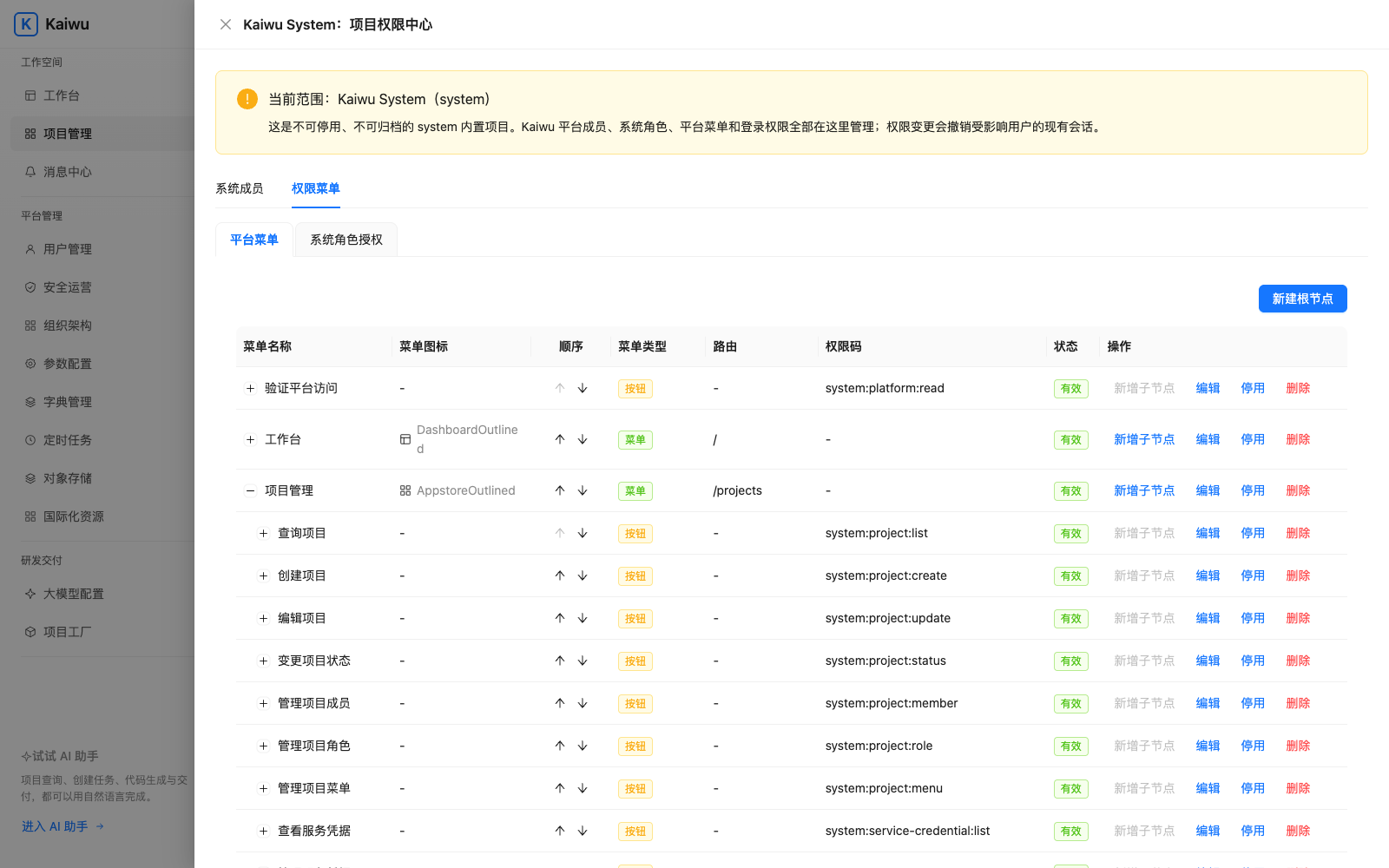
In Project Management, open the project’s permission center, create a role, grant its menu permissions and assign it to an existing user. This example assumes `alice` exists and [manifest sync](https://kaiwu.shengzhiweilai.online/en/config) has registered `order:order:list`.
```bash
./kaiwu access role-create order-center auditor --name "Auditor"
./kaiwu access role-grant order-center auditor --permissions order:order:list
./kaiwu access member-set order-center alice --roles auditor
```
`role-grant` replaces the role’s permission set. `member-set` replaces the member’s roles and enables the membership by default. Read current assignments before modifying an existing object. Read them back, sign in as the member, and verify both UI hiding (via `useCan` / `` from `@/kaiwu`) and backend enforcement.
In product-led projects, demo personas (`mock-support/personas.ts`) map to roles defined in frontend `kaiwu/roles.yml`. The first `./kaiwu project adopt --apply` imports those initial roles automatically; subsequent runs and regular `project sync` preserve manual platform edits unless `--with-access` is explicitly passed.
## Filter order rows
When coding agents generate CRUD endpoints, the most common security gap is checking menu permissions while forgetting row-level isolation. Kaiwu enforces row scopes across Gateway and Starter without adding runtime callbacks:
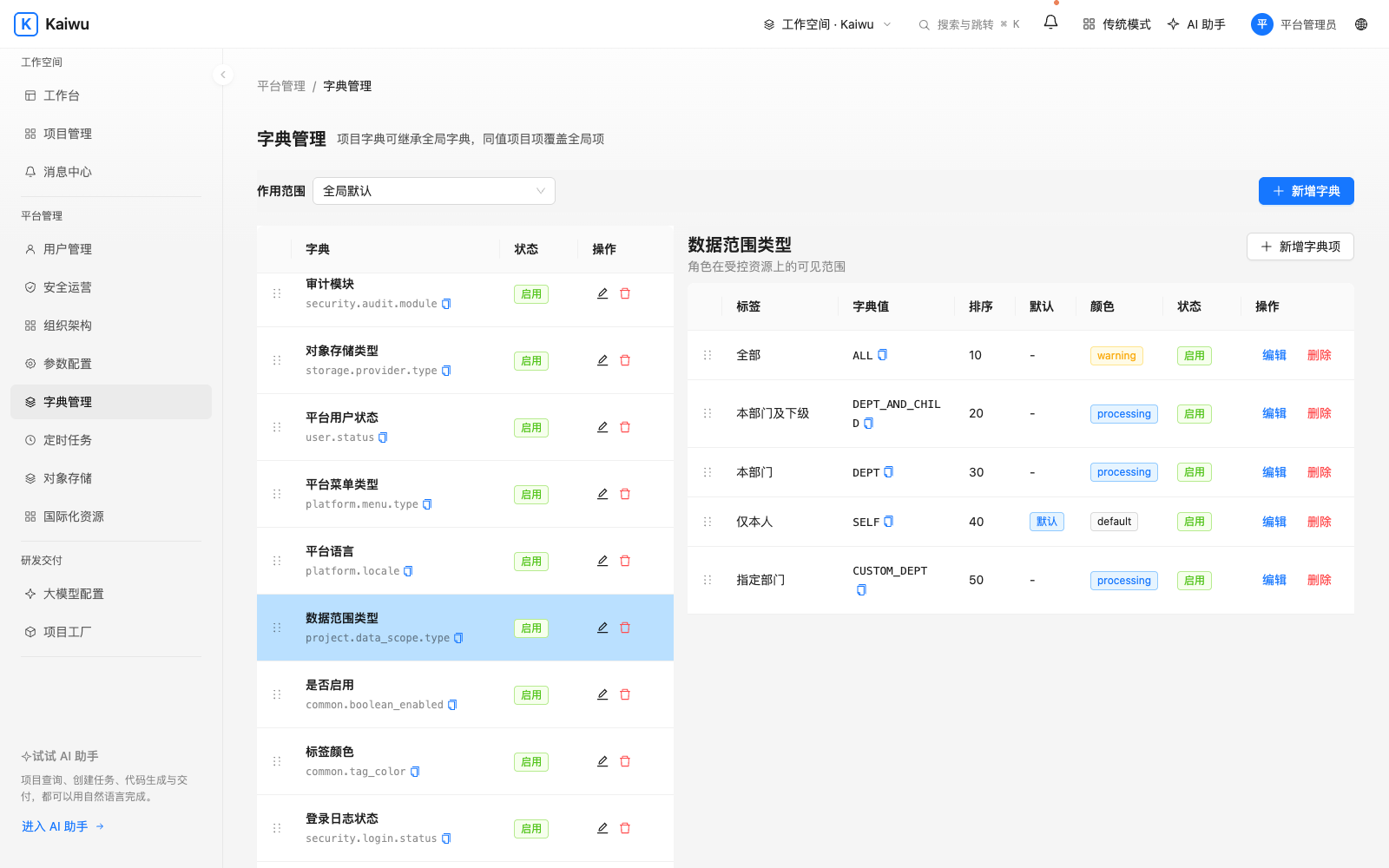
- **Five fixed scope types with role union**: Supports `ALL`, `DEPT_AND_CHILD`, `DEPT`, `SELF`, and `CUSTOM_DEPT` (with optional child departments). Multiple roles resolve to their union, and unconfigured roles default to `SELF`.
- **Zero-callback signed propagation**: System resolves the scope snapshot and Gateway embeds the `ds` claim into the 60s signed Context. Business services never call back to System on normal requests.
- **Table-level SQL enforcement & build gates**: Add `com.kaiwuzaidao:kaiwu-data-scope:0.2.0` to `domain`, register its interceptor before pagination, and declare protected tables (or explicit `exempt` reasons) in `kaiwu/data-scopes.yml` under `META-INF/kaiwu/`. Indexed `owner_user_id` and `owner_dept_id` columns are auto-filled on insert; ownership transfers use `DataScopes.reassign`, background jobs use audited `DataScopes.unrestricted("reason", ...)`, and `DataScopeConventionTest` checks ownership fields and indexes, rejects references to protected tables in `JdbcTemplate` source, and warns about potentially undeclared list, page, or export endpoints.
Sync the resources, configure per-role scopes in the permission center, and verify two owners across list results, paginated totals, and out-of-scope updates. [Integration code][rows] · [Platform scope rules][scope]
# Sync manifests and transfer configuration
Manifest ownership follows how the project starts: **dual-repo scaffolds (`project new`) store `kaiwu/*.yml` in the backend repository**; **product-led projects (started from `kaiwu-web-starter` and adopted via `project adopt`) maintain `kaiwu/*.yml` in the frontend repository** so the mock runtime reads them directly and the backend points to them via `kaiwu/frontend-manifests`.
Add this list item to your project’s `kaiwu/dicts.yml`, replacing `order-center` with your project code. If the file still contains the initial empty list `[]`, replace it with the example. Store the stable value `PENDING` in the application and resolve its label through the dictionary (e.g., via `useDict` from `@/kaiwu`).
```yaml
- dictCode: order-center.order_status
name: Order status
items:
- value: PENDING
label: Pending
color: processing
default: true
```
Run the first command in the entry repository to preview the entire plan. Check the environment, project, and every resource before applying it. For product-led projects, pass the frontend directory instead (`project adopt` imports `roles.yml` on initial adoption, while subsequent `project sync` runs preserve platform role edits unless `--with-access` is explicitly supplied):
```bash
./kaiwu project sync ../business/order-center-service
./kaiwu project sync ../business/order-center-service --apply
```
| File under `kaiwu/` | Purpose |
| --- | --- |
| `menus.yml`, `dicts.yml`, `configs.yml` | Menus and buttons, dictionaries, and managed settings. Supply defaults in consuming code. |
| `jobs.yml`, `i18n.yml` | Scheduled task declarations and project translations. |
| `data-scopes.yml`, `roles.yml` | Scope resources and role grants. Initial adoption imports `roles.yml` once; ongoing role updates require explicit `--with-access`. |
| `workflows/` (optional) | Workflow definitions and bindings for projects using the optional Workflow service (`./kaiwu workflow sync `). |
Inspect the stable value in the project dictionary and verify the page in another language. Sync creates resources, updates fields owned by the manifest and preserves existing setting values. Kaiwu uses **project-scoped referenced i18n** (`scope_id` isolates each project from the global catalog), so project admins can manage their own translations without global i18n permissions and without leaking vocabulary across projects. The plan lists removed declarations; confirm any deletions individually on the configuration transfer page. Global defaults and the built-in `system` project belong to the platform. [Managed settings][params] · [Sync rules][sync]
## Transfer between environments
Promoting menus, dictionaries, role grants, and scheduled jobs from staging to production often relies on fragile SQL scripts or manual re-entry—leading to mismatched database IDs, missing row scopes, or test jobs firing immediately in production.
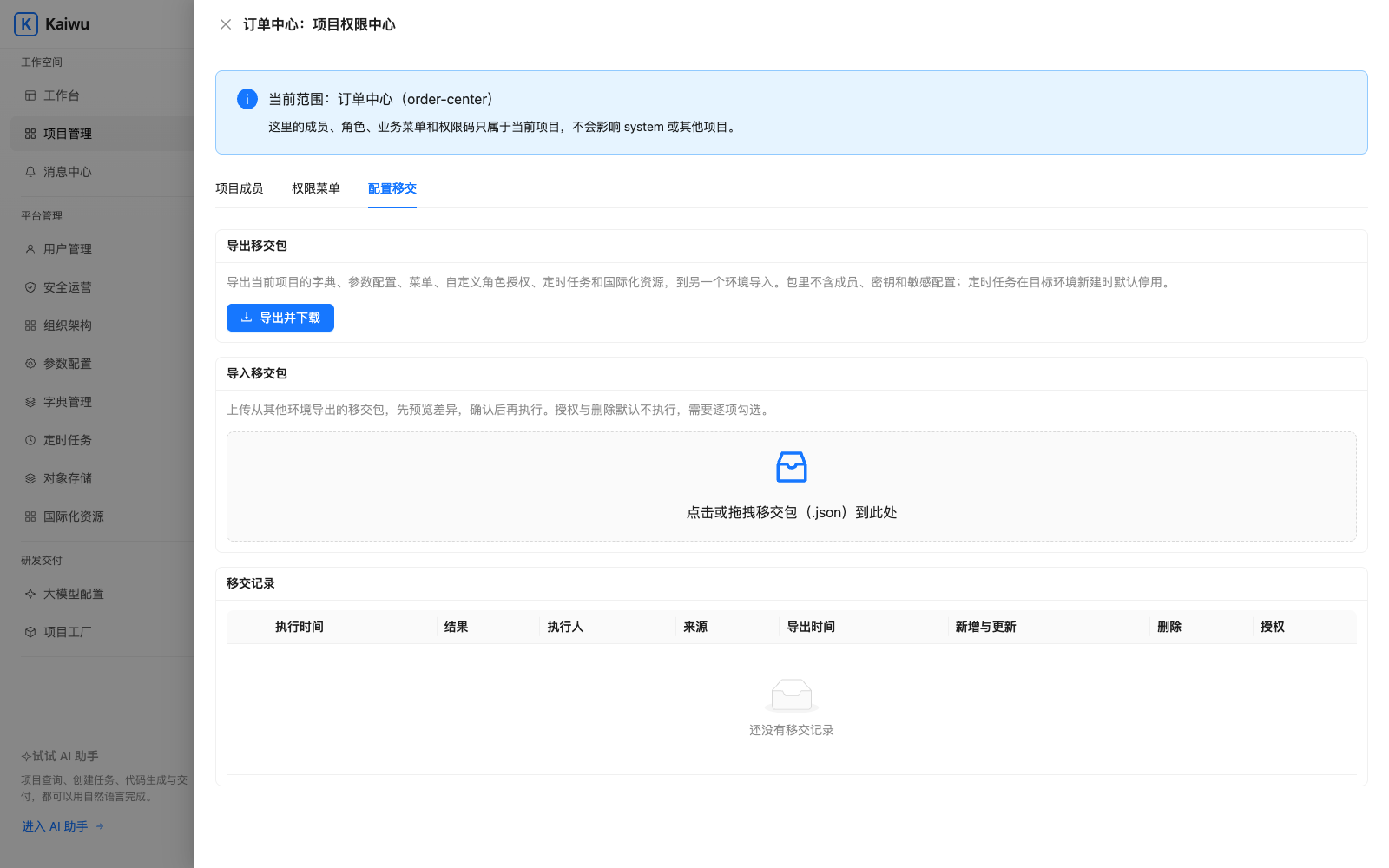
Export a package in the source project’s **Permission Center → Config Handover** and import it into the matching project in the target environment with four built-in safeguards:
- **Six-file full snapshot**: The JSON handover package bundles `dicts.yml`, `configs.yml`, `menus.yml`, `roles.yml` (including role `dataScopes`), `jobs.yml`, and `i18n.yml` in the exact same YAML format as `kaiwu/` plus a `sha256` digest. Secret configs are automatically omitted with explicit `warnings`, and exported YAML files can be committed straight back into Git.
- **Business-key matching, zero DB ID coupling**: Menus match by permission code, route, or directory path, and custom-department data scopes match by `deptCode` rather than environment-specific primary keys.
- **Three-way baseline diff + 409 concurrency guard**: `plan` compares the previous handover baseline, the incoming package, and the live target state to produce a plan hash; `apply` rejects with `409` if the target changed after preview.
- **Risk-tiered opt-in**: Normal settings apply while preserving live runtime values; **role grants (`ACCESS`) are off by default and opt in as a group; source removals (`REMOVED_AT_SOURCE`) require individual selection**, while target-only additions are flagged as drift and never auto-deleted. **New scheduled jobs import as disabled** and validate online handlers; members and secrets stay local to each environment, with every transfer recorded in handover audit history. [Package contents][handover]
# Tasks, messages and scheduling
Inbox notifications (`NotificationClient`) are **immutable fact alerts** (read/unread), whereas unified tasks (`TodoClient`) represent **actionable items whose lifecycle stays tied to business state**. Business services open, update, and close tasks idempotently by `(project, bizKey, assignee)` so approved items vanish automatically from the workbench without forcing every app to build its own task inbox. Both share the same delivery credential and log failures without blocking domain transactions. [SDK configuration][sdk]
## Track an approval
```java
String key = "approval:" + order.getNo();
todoClient.open(approverId, key, "Order awaiting approval");
// Any-one approval: close(key) clears all assignees; countersign: close one assignee
todoClient.close(key, approverId);
```
Keep the same business key across retries to update rather than duplicate tasks. This natively models **any-one approval (`close(key)`), countersigning (`close(key, userId)`), withdrawal (`cancel(key)`), overdue pinning**, and automatic retention cleanup. Sign in as the approver, repeat delivery and check the open count, then close the task and verify it leaves the list. Use `NotificationClient` to send an inbox message and check its title, body and read state as the recipient. [To-do contract][todo]
## Schedule a job in a business service
The scheduler never dispatches arbitrary class names, shell scripts, or URLs—only fixed handlers registered by the business service, protected by **central lease claiming and cooperative `fencingToken()` / `assertLeaseActive()` fencing** so handlers can stop further writes after losing the lease:
1. Implement `ProjectScheduledTaskHandler` in the backend. Return a stable type such as `report.daily` from `taskType()` and call domain code from `execute(context)`.
2. Set `kaiwu.starter.scheduler.enabled` and configure the project identity and scheduler credential. The service registers its handler on startup.
3. Declare the same type in `kaiwu/jobs.yml` and [preview and sync the manifest](https://kaiwu.shengzhiweilai.online/en/config). Check the cron expression and time zone in the scheduler before enabling the job.
4. Inspect the execution history and the resulting business record. Delivery is at least once. Deduplicate by `context.executionId()` or job ID and scheduled time. For long jobs call `context.assertLeaseActive()` between batches. [Scheduling and leases][sdk]
# File storage and Excel
The three Maven Central components use group `com.kaiwuzaidao` and version `0.2.0`. Use `kaiwu-system-starter` for platform integration and optional storage, `kaiwu-data-scope` for row filtering and `kaiwu-excel` for workbook I/O. [Starter][sdk] · [Data scopes][rows] · [Excel][excel]
## Bind storage to a project
A platform administrator configures an account in Object Storage. From the entry repository, complete [CLI sign-in](https://kaiwu.shengzhiweilai.online/en/after-generation), then call the System launcher. Substitute your account and project for `assets` and `order-center`.
```bash
cli=./workspace/kaiwu-system-service/scripts/kaiwu.sh
"$cli" storage accounts
"$cli" storage test assets
"$cli" storage bind order-center --account assets --max-mb 10 --types image/png,image/jpeg
"$cli" storage bindings order-center
```
In v0.2.0, Gateway is missing some storage administration routes. If an administrator gets a 404 when listing accounts or bindings, see the [Gateway fix](https://github.com/kaiwuzaidao/kaiwu-gateway-service/pull/1).
The probe writes and deletes a test object. Enable storage in the backend and select the `kaiwu` provider for three built-in safeguards:
- **Long-term keys stay inside System**: OSS / S3 credentials remain encrypted in System; apps receive only STS temporary credentials scoped to `{bucket}/{projectCode}/*` (prefetched and renewed in the background).
- **File bytes bypass System**: Uploads and presigned downloads go straight to object storage so the control plane never becomes a traffic bottleneck.
- **Reference-based storage, zero URL lock-in**: Business tables store `storage_ref` and `object_key` rather than full URLs, so existing files remain readable through their original binding while that binding and the objects remain available.
When a project needs a unified file ledger, create a migration from `docs/storage-file.sql` in the Starter repository and enable `StoredFileService` for upload confirmation, soft-delete retention, and automated orphan cleanup (`kaiwu.file.purge`). Enforce ownership and permissions in your business endpoints, test upload/read as a member, verify denial for unauthorized users, and check rejected writes on a `READ_ONLY` binding. [Configuration examples][storage] · [Registry contract][registry]
## Import and export an order list
Add `com.kaiwuzaidao:kaiwu-excel:0.2.0` in the business domain module. `ExcelTable` enforces strict safety bounds out of the box—unencrypted single-sheet XLSX only, ordered header contracts, **formula rejection**, ZIP entry (256) and expanded-size (16 MiB) caps, and fail-fast limits instead of silent truncation. The example binds the workbook to the declared column order. Import `com.kaiwu.excel.ExcelTable`.
```java
var headers = List.of("Order number", "Amount");
byte[] template = ExcelTable.template(headers);
var rows = ExcelTable.read(file.getInputStream(), headers, 5 * 1024 * 1024, 5000);
var result = ExcelTable.process(rows, row -> validateAndSave(row));
```
Implement `validateAndSave` in the application and return a safe error message or `null`. Test the template with one invalid amount and verify the reported row number. For exports reuse the list’s filters, permission checks and row scope. Query at most the limit plus one, reject an oversized result, then call `ExcelTable.write`. Treat order numbers as text to preserve leading zeros. [Supported XLSX format and limits][excel]
# Models and project actions
For a coding tool that edits Java or React, use the [coding agent guide](https://kaiwu.shengzhiweilai.online/en/ai-development). This chapter is for administrators and backend developers exposing business queries or actions to authorized members inside the platform. The project factory can generate a scaffold independently.
## Choose planning and answer models
First have the operator configure the allowed model host and controlled egress proxy. [Runtime configuration][nacos]
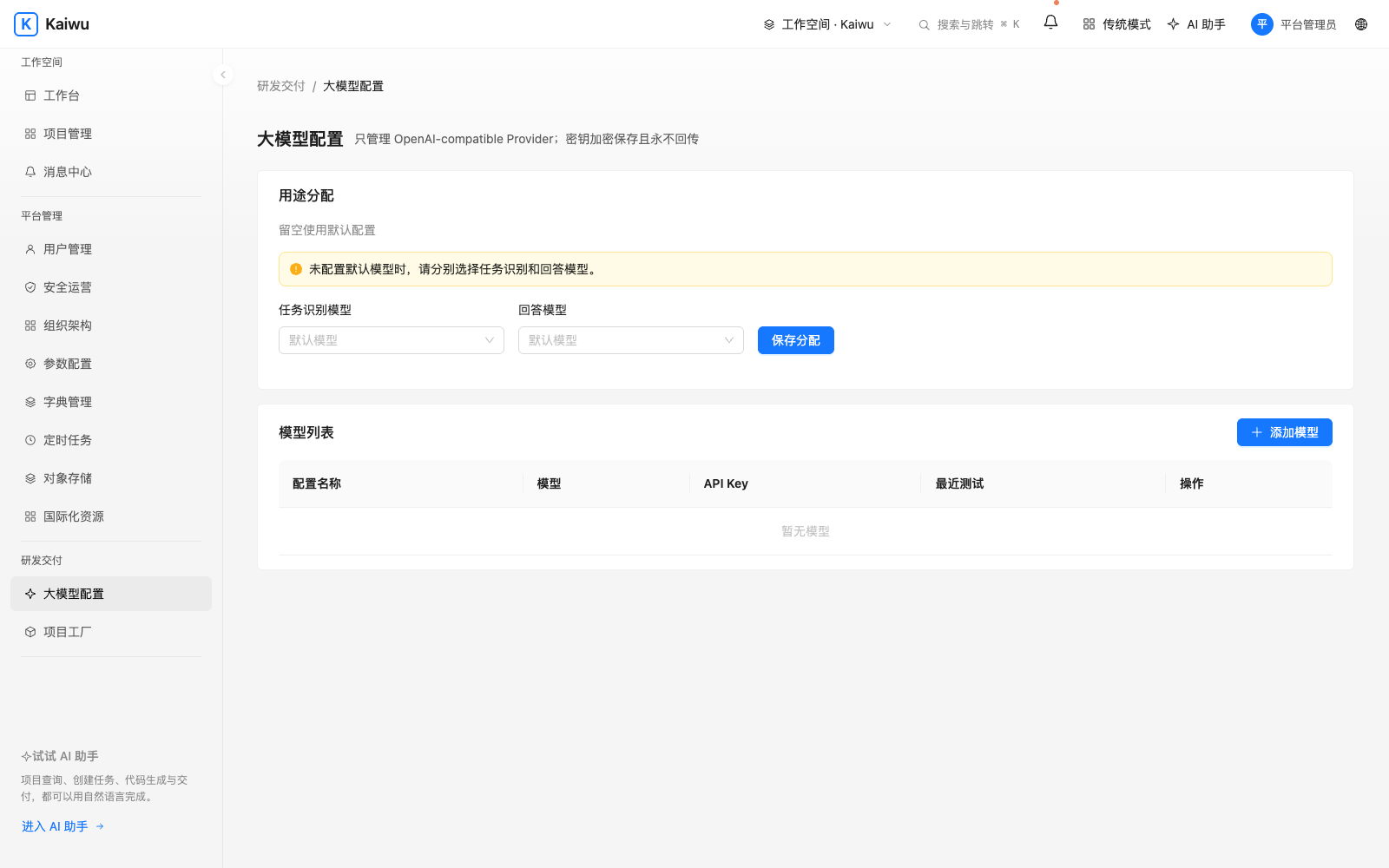
In model configuration, add an OpenAI-compatible provider, enter its endpoint, model name and credential, save and test the connection. Assign PLAN (recognition and planning) and ANSWER (response generation). Both may use the same configuration. An unbound purpose uses the existing default when available. After changing the endpoint, update the credential and retest. Check both stages with a question whose answer is known. [Model routing rules][models]
## Let the assistant look up an order
Declare a fixed capability in the backend, such as looking up status by order number. Specify its code, version, inputs, output fields and existing permission. Call the domain query through a typed read adapter, check membership and row scope, and return only declared fields. Register the version and obtain approval on the platform. Query as an authorized member and check denial for an unauthorized one. [Capability declaration][capabilities] · [Typed reads][read]
## Confirm a write operation
Implement preview and execution separately with `TypedAgentWrite`. A preview shows the target order and fields and freezes preconditions such as its version. After confirmation, recheck ownership, state and version inside the business transaction. Use the runtime execution ledger for retries. Test cancellation, an order changed after preview, a successful write and duplicate submission. Keep business audit records and redact the handoff. [Typed write contract and example][write]
# Platform administration
Choose a project from the workbench after signing in. Members find their project entries, to-dos and messages here. Administrators can register projects, manage access and investigate runtime issues. If a menu is missing, check the identity, current project and role first.
| Task | Procedure | Verify |
| --- | --- | --- |
| Open a business project | Register its name and unique code in Projects—or run `project adopt` on an existing product frontend—then inspect Project Factory | Download both ZIPs for new scaffolds, or the companion backend ZIP for `ADOPT_FRONTEND` tasks, and open the entry from the workbench. [Project walkthrough](https://kaiwu.shengzhiweilai.online/en/after-generation) |
| Add a member | Verify the user in organization and user management, then assign a member and roles in the project permission center | Have the member sign in and check accessible projects, menus and rows. [Access example](https://kaiwu.shengzhiweilai.online/en/access) |
| Update a dictionary or setting | Open the project dictionary, managed settings or translations. Preview changes to repository declarations | Refresh the page and check the label, effective value and language fallback. [Sync and transfer](https://kaiwu.shengzhiweilai.online/en/config) |
| Handle a task or message | Open a workbench to-do or an inbox message | Check the open count after completion and the read state in the inbox. [Integration](https://kaiwu.shengzhiweilai.online/en/services) |
| Inspect a scheduled job | Select the project in the scheduler and check the type, cron, time zone and enabled state | Inspect its last run, status and business result. [Scheduling](https://kaiwu.shengzhiweilai.online/en/services) |
| Check storage or a model | Inspect the project storage binding or test the model connection and purpose binding | As a member, complete a [file read](https://kaiwu.shengzhiweilai.online/en/files) or an [authorized query](https://kaiwu.shengzhiweilai.online/en/assistant) |
| Manage sessions | Manage your account in the profile. Check the client name on device approval. Administrators inspect sessions in the security center | Revoke a specific CLI session, then check `./kaiwu whoami` on that client |
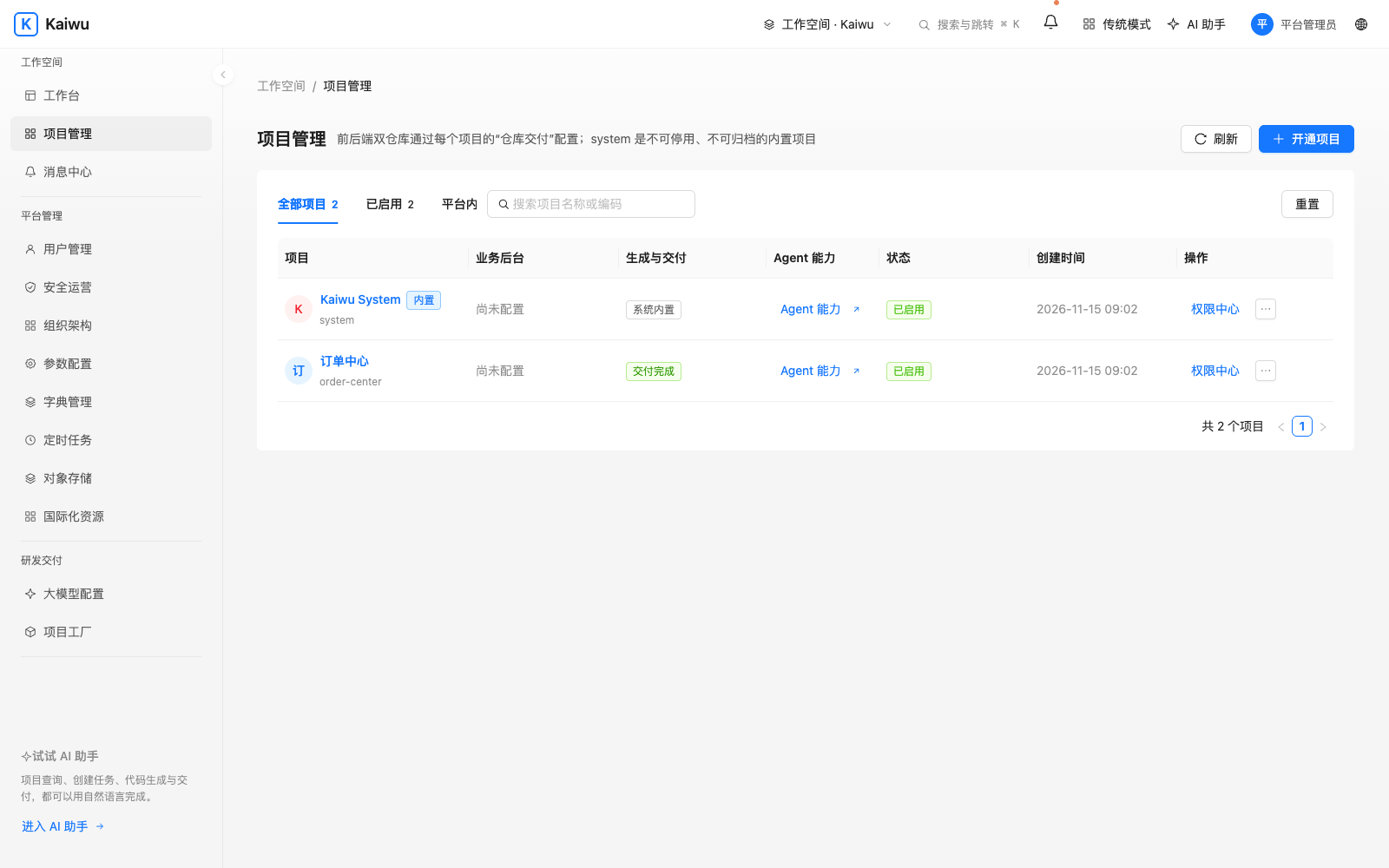
For a business page that fails to open, record the project code, entry path, time and HTTP status. Then [follow the request](https://kaiwu.shengzhiweilai.online/en/how-it-works).
# Database, deployment and troubleshooting
## Choose and initialize a database
| Use case | Procedure |
| --- | --- |
| First local installation | `KAIWU_DB_TYPE=mysql ./kaiwu up` creates MySQL. Startup runs the migrations. |
| Existing MySQL | Prepare a separate empty database and supply `KAIWU_DB_HOST`, port, database, username and password in protected runtime configuration. |
| Dameng DM8 | Prepare a separate empty schema. Check UTF-8, page size, case sensitivity and compatibility mode. Run the database guide’s preflight checks. |
| DBA review of initialization data | In a separate empty database, run `mysql-01-ddl.sql` or `dm8-01-ddl.sql`, then the matching `02-dml.sql` file to inspect seed data. Application startup requires Flyway history. Use a separate empty database for Compose or Helm so its migration task initializes the schema and records that history. |
v0.3.0 installs apply V127 and V128. Existing v0.2.0 installations apply V128 through the existing migration process. A v0.1.0 (V44) installation needs a new database. For intermediate versions choose the path for the last successful Flyway version. Initialization scripts can damage an existing database. Take a recoverable backup before upgrading. [Database configuration][db] · [Initialization SQL downloads and instructions][sql] · [Version-specific upgrade paths][upgrades]
## Deploy on a server or Kubernetes
- **Single-server Compose**. Check out matching product versions, then run `./scripts/kaiwu-server-env.sh ../.kaiwu-server/runtime.env` from System to prepare runtime configuration. Use the base and server Compose files together as documented. Configure the reverse proxy and same-origin entry, deploy the business backend and frontend, and verify an authenticated read from the workbench. [Server and external MySQL / Redis][server]
- **Kubernetes**. Run `./kaiwu deploy-init` to fetch the GitOps repository. Find the Chart in System under `deploy/helm/kaiwu`. Pin image versions and prepare the namespace and runtime credentials. Use `helm lint` and `helm template` to check the target values. After installation check the migration Job, Pod readiness, explicit route and same-origin business UI. [Install, upgrade and roll back][helm]
- **Nacos development environment**. Give System and Gateway their respective Data IDs. Set route audiences explicitly and configure egress for the actual storage and model hosts. Start the environment with `local-up` in the System launcher and inspect native processes with `local-status` and `local-logs`. [Configuration templates and startup parameters][nacos]
## Troubleshooting
| Symptom | First check |
| --- | --- |
| A second instance conflicts with ports or connects to an old database | Use a separate checkout, project name, published ports and platform network. Reuse those settings for this instance. Inspect `./kaiwu status`. |
| Image pull fails | Distinguish download failures from source build failures in the logs. Use `./kaiwu up --build` to select source builds explicitly. |
| Sign-in fails or the CLI points to another platform | Compare the browser URL, CLI `KAIWU_URL` and `./kaiwu whoami`. Inspect first-login credentials locally. |
| Workbench works but the business page fails | Check membership, project entry, frontend mount and explicit Gateway route. Run `./kaiwu logs --tail 100`. [Follow a request](https://kaiwu.shengzhiweilai.online/en/how-it-works) |
| A configuration change has no effect | Check the project code, sync preview, target environment and current identity. Start a new session if required. [Configuration transfer](https://kaiwu.shengzhiweilai.online/en/config) |
Use `./kaiwu down` to pause the local platform and retain its data. `./kaiwu reset` deletes local platform data.
# CLI reference
Prefix the following commands with `./kaiwu` in the entry repository. Replace uppercase arguments with actual values. Brackets indicate optional arguments and a slash separates alternatives. Choose one alternative when executing a command. For a first installation, [start here](https://kaiwu.shengzhiweilai.online/en/start).
## Platform runtime
| Command | Purpose |
| --- | --- |
| `doctor` | Check local prerequisites. |
| `repositories` | Preview repository source and version policy. |
| `init [--with-deploy]` | Fetch runtime repositories, optionally including GitOps. |
| `up [--build / --no-build]` | Start the platform. A release normally pulls images. Use --build for source builds. |
| `dev` | Run infrastructure in Docker and applications as native processes. |
| `status` | Inspect container status. |
| `logs [--tail N] [-f]` | Read recent logs or follow with -f. |
| `local-status / local-logs / local-down` | Inspect, follow logs or stop native processes. |
| `credentials` | Show first-login credentials locally. |
| `context-public-key` | Print the public key used by business backends to verify Gateway Context. |
| `reload-routes` | Reload managed routes in local Compose. |
| `down / reset` | down stops and retains data. reset deletes local platform data after confirmation. |
| `deploy-init / help` | Fetch the optional GitOps repository or show launcher help. |
## Sessions and projects
| Command | Purpose |
| --- | --- |
| `login [--client NAME] [--local]` | Authorize this client. --local attempts local approval. Remote approval belongs to the account holder. |
| `whoami / logout` | Inspect identity or revoke the CLI session. |
| `project new CODE --name NAME [--package PKG] [--description TEXT]` | Register a project and generate its scaffold once. |
| `project status CODE [--wait]` | Inspect progress, optionally waiting for completion. |
| `project pull CODE [--dir DIR]` | Download and unpack both repositories and initialize Git. |
| `project adopt FRONTEND [--apply]` | Register an existing product frontend, sync manifests/initial roles, and generate the companion backend (`ADOPT_FRONTEND`). |
| `project-up BACKEND [FRONTEND]` | Build the business project and connect it to the local platform. |
| `project-down CODE` | Stop that business stack and retain its data. |
| `project entry CODE LABEL SERVICE_URL` | Register the entry label and service root URL. |
| `project sync MANIFEST_REPO [--apply] [--with-access]` | Preview or sync `kaiwu/*.yml` (from a backend or adopted frontend repo). Include role grants explicitly with `--with-access`. |
| `workflow sync FRONTEND [--apply]` | Preview or import `kaiwu/workflows/` definitions (requires compatible Workflow service). |
## Members and grants
| Command | Purpose |
| --- | --- |
| `access members CODE / access roles CODE / access permissions CODE` | List members, roles or grantable permissions. |
| `access role-create CODE ROLE --name NAME [--description TEXT]` | Create a project role. |
| `access role-grant CODE ROLE (--permissions p1,p2 / --clear)` | Replace the role’s permission set. Use --clear to empty it. |
| `access member-set CODE USER --roles r1,r2 [--disabled]` | Replace the member’s roles and enable membership by default. --disabled disables it. |
| `access member-remove CODE USER` | Remove a project member. |
## Product & frontend repository scripts
Run these commands inside a repo created from `kaiwu-web-starter` or Project Factory:
| Command | Purpose |
| --- | --- |
| `node scripts/kaiwu-init.mjs --code CODE --name NAME [--example booking]` | Initialize a standalone business frontend from `kaiwu-web-starter` (blank by default; optional `booking` or `purchase` example). |
| `pnpm dev` | Start dev server in Mock mode by default; open `/__mock/` to switch personas and reset in-memory data. |
| `pnpm dev:real` | Disable Mock and proxy `/api`, `/{code}-api`, and `/{code}-svc` to `KAIWU_GATEWAY` (`http://127.0.0.1:8088` by default). |
| `pnpm verify:mock` | Product-stage gate: typecheck, dictionaries, `@/kaiwu` lock, rule/scenario/mock linkage, log redaction, constraints, and dist isolation check. |
| `pnpm verify` | Integration-stage gate: `verify:mock` plus three-way permission parity against backend `@RequirePermission` annotations. |
| `pnpm test:scenarios` / `pnpm test:browser` | Run HTTP scenario tests / Chromium E2E tests against an isolated mock server. |
| `pnpm test:proxy` | Verify path and project header forwarding against a local echo server, or real Gateway responses when `KAIWU_GATEWAY` is set. |
| `sh scripts/check-runtime-image.sh "$IMAGE" CODE` | Verify the built production frontend container serves the app index and returns 404 on `/__mock/`. |
Backend annotation checks require the paired backend in the expected adjacent directory or an explicit `KAIWU_SERVICE_DIR`. Check the output to confirm the comparison ran.
## System launcher extensions
Prefix these commands with `./workspace/kaiwu-system-service/scripts/kaiwu.sh`. Use `local-up` for an existing Nacos environment. Use `storage accounts` to list accounts, `storage bindings [CODE]` to list bindings and `storage test ACCOUNT` to write and delete a probe. `storage bind CODE --account ACCOUNT` supports `--name`, `--max-mb` and `--types`. Use `storage bind-status ID --status ACTIVE` with ACTIVE, READ_ONLY or DISABLED. [Storage walkthrough](https://kaiwu.shengzhiweilai.online/en/files)
Set `KAIWU_URL` to select a remote platform, `KAIWU_REPOSITORY_REF` to pin checkout versions and `KAIWU_REPOSITORY_BASE_URL` to select a fork’s repository group.
# How Kaiwu works
Understand Kaiwu’s architecture, request lifecycle, and three core boundaries in 10 minutes.
## 1. Independent product and starter repositories
Kaiwu is not a giant monorepo. The entry repository only holds bootstrap scripts and orchestration; product source lives in **independent Git repositories**:
| Repository | Role | Responsibility |
| --- | --- | --- |
| `kaiwu-gateway-service` | **Single external entry** (8088) | Same-origin routing, JWT & session checks, signed internal Context |
| `kaiwu-system-service` | **Control plane backend** | Users, projects, roles, menus, dictionaries, i18n, and Project Factory |
| `kaiwu-system-web` | **Platform frontend** (8000) | Unified workbench, access center, dictionaries, i18n, and config UI |
| `kaiwu-system-starter` | **Business service SDK** | Maven dependency for business backends; local Context verification |
| `kaiwu-web-starter` | **Product frontend starter** | Zero-platform React starter with built-in `/__mock/` runtime and `@/kaiwu` integration layer |
| `kaiwu-deploy` (optional) | **GitOps manifests** | Environment overlays when deploying to Kubernetes / ArgoCD |
## 2. How a request flows
Take an Order Center app opened from the workbench (`/apps/order-center/`). Its frontend calls a same-origin `/order-center-api/` path:
1. **Web Nginx proxy**: Browsers never connect directly to backend services; Nginx forwards `/api` and app APIs to **Gateway**.
2. **Session & membership check**: **Gateway** validates the Access JWT and active Redis session, and verifies project membership with **System** (cached).
3. **60-second signed Context**: **Gateway** issues a short-lived (60s), audience-bound signed Context and forwards the request to the business service.
4. **Local verification in Starter**: The business backend verifies the signature **locally** via **Starter SDK**, checks endpoint permissions, and can filter queries using the configured data scopes.
| Symptom | Check order |
| --- | --- |
| Missing workbench entry | Enabled project membership, registered app entry, and frontend mount path. |
| API returns 401 | Active session, request routed through Gateway, matching public key and `audience`. |
| API returns 403 | Role grants for the declared permission code, and a fresh session after grant changes. |
| Empty list | Organization, active project, row-level data scope, and business filters for the same member. |
## 3. Three core design boundaries
Most architectural choices in Kaiwu come down to three boundaries:
1. **Gateway holds no permission truth**: Gateway handles identity, sessions, and routing only. **System** is the single source of truth for permissions so rules never drift.
2. **Kaiwu itself is a project**: Platform members, roles, and menus live under a built-in project (`project_code=system`) using the exact same tables and authorization path—no privileged bypass.
3. **Generated apps can leave the platform**: Project Factory runs **once** per app—either scaffolding both repos (`BASIC_SCAFFOLD` via `project new`) or adopting a product-built frontend and generating only its companion backend (`ADOPT_FRONTEND` via `project adopt`). Kaiwu never overwrites your business code afterward.
## 4. Where product, AI, and guardrails fit
LLMs write code fast, but often miss permission wiring, database migrations, or CI contracts. Kaiwu separates product exploration from engineering enforcement:
- **Product-first frontend (Mock stage)**: Product & AI start from `kaiwu-web-starter` (with built-in Umi Mock runtime, 501 fallback, and `/__mock/` persona switcher) and access platform hooks through the read-only `@/kaiwu` layer so UI libraries can be swapped cleanly. Rules (`docs/business-rules.md`) and scenarios (`docs/acceptance-scenarios.md`) are checked by `pnpm verify:mock`, `pnpm test:scenarios`, and `pnpm test:browser` on `product` before handing off via `handoff/*` MRs.
- **Adoption or blueprint generation**: Engineers run `./kaiwu project adopt --apply` to register an accepted frontend, import manifests/initial roles, and scaffold the Spring Boot service—or generate both repos deterministically from a validated `ProjectBlueprint`.
- **Real integration & cross-environment promotion**: Both repos ship `AGENTS.md`, backend `scripts/verify.sh`, and frontend `pnpm verify`. Permission codes match across UI checks, `kaiwu/menus.yml`, and `@RequirePermission`, while `DataScopeConventionTest` checks declared ownership conventions and flags potentially undeclared endpoints. Engineers verify via `pnpm dev:real` and production image checks (`/__mock/` returns 404), then promote dictionaries, menus, settings, role grants, jobs, and project-scoped i18n cleanly via `project sync` and Config Handover.
## 5. Built-in enterprise platform capabilities
Alongside independent repo delivery, every connected app can adopt Kaiwu’s shared capabilities on demand:
- **MySQL & Dameng DM8 dual database support**: First-install choice for the platform control plane with a dedicated `kaiwu-dm-migrator` and preflight checks.
- **Cross-environment config handover (ADR 0042)**: 6-file YAML full snapshots with 3-way baseline diff previews, explicit opt-in for role grants and removals, and newly imported jobs disabled by default.
- **Role × department row-level data scope (`kaiwu-data-scope`)**: Gateway propagates signed `ds` claims and Starter injects SQL predicates automatically with zero runtime callbacks.
- **STS object storage & safe Excel**: Long-term keys stay inside System; apps receive prefix-scoped STS tokens and store `storage_ref + object_key` instead of URLs, while `kaiwu-excel` rejects formulas and zip bombs.
- **Unified tasks & guarded AI assistant**: `TodoClient` manages idempotent any-one/all-sign tasks, and the assistant separates `PLAN` and `ANSWER` models with permission-scoped reads and preview-before-write confirmation.
## Next steps
- [Install and sign in in 5 minutes](https://kaiwu.shengzhiweilai.online/en/start)
- [Generate and run your first business project](https://kaiwu.shengzhiweilai.online/en/after-generation)
- [Repository map](https://kaiwu.shengzhiweilai.online/en/repos) · [Starter verification][sdk]
# Repositories and versions
For a new installation, choose the latest stable release tag. This handbook uses `v0.3.0`. The entry and product repositories use matching tags. Inspect the source and version policy with `./kaiwu repositories` and fetch runtime repositories with `./kaiwu init`. The System manifest selects repositories. `workspace/.kaiwu/workspace.lock` records the resolved checkout.
| Change | Location |
| --- | --- |
| Local checkout, bootstrap and commands | Entry repository `kaiwu` ([GitHub][github] · [Gitee][gitee]) |
| Project factory, platform APIs, database and Helm | `workspace/kaiwu-system-service` |
| Session verification and business API routes | `workspace/kaiwu-gateway-service` |
| Workbench, permission center and administration UI | `workspace/kaiwu-system-web` |
| Backend integration, row scope and Excel | `workspace/kaiwu-system-starter` |
| Zero-platform product frontend starter (Mock runtime, contracts & `@/kaiwu`) | [kaiwu-web-starter][starter] |
| Environment and application delivery manifests | `kaiwu-deploy`, fetched by `./kaiwu deploy-init` |
| Domain features such as orders or equipment booking | Standalone repos from `project pull`, or a `kaiwu-web-starter` frontend paired with its backend via `project adopt` |
For an existing installation, check the database migrations and runtime configuration using the [upgrade guide][upgrades].
Match the running version before consulting the owning repository’s `AGENTS.md`, `README.md` and tests. See [project delivery](https://kaiwu.shengzhiweilai.online/en/after-generation) and [business development](https://kaiwu.shengzhiweilai.online/en/business). [Release notes][release]
# When to use Kaiwu
Teams running several business applications can share a workbench, identity, roles, dictionaries and notifications. Each project owns its domain code, data and release schedule.
- **Ship product-built frontends without rewrites**: Product managers and AI can build a persona-tested mock frontend first in `kaiwu-web-starter`, lock in rules and scenarios, and hand over via Git and `project adopt` so backend engineers wire real APIs in the exact same frontend repo. See [product handoff](https://kaiwu.shengzhiweilai.online/en/business#product-handoff).
- **Start a project**: [Initialize from starter or generate both repositories](https://kaiwu.shengzhiweilai.online/en/after-generation), then [develop your first feature](https://kaiwu.shengzhiweilai.online/en/business) across equipment booking or order lists.
- **Govern multiple teams & environments**: Configure project membership and SQL-enforced [row scope](https://kaiwu.shengzhiweilai.online/en/access), sync `kaiwu/*.yml` from Git, and [transfer 6-file config snapshots](https://kaiwu.shengzhiweilai.online/en/config) across staging and production with 3-way diff preview.
- **Reuse enterprise plumbing safely**: Adopt idempotent workbench tasks and leased jobs ([services](https://kaiwu.shengzhiweilai.online/en/services)), prefix-scoped STS object storage and safe Excel I/O ([files](https://kaiwu.shengzhiweilai.online/en/files)), plus first-install support for **MySQL or Dameng DM8** ([operations](https://kaiwu.shengzhiweilai.online/en/operations)).
- **Develop with AI & expose guarded assistant actions**: Give the coding agent repository paths, scope, checks and acceptance criteria ([sample task](https://kaiwu.shengzhiweilai.online/en/ai-development)), or expose permission-scoped reads and preview-before-write business actions in the [project assistant](https://kaiwu.shengzhiweilai.online/en/assistant).
# Live demo
[Enter the System workbench →][trial]{target="_self"}
The demo signs you in as **demo-admin** and opens the System workbench. Explore the platform menus or open the [website redesign project][project] from the workbench. In the project, the sidebar follows the account’s project permissions. Tasks, pages and milestones come from the project’s own database. The business interface follows the shared account’s language preference.
1. Under **改版任务** (tasks), open **联调官网在线体验入口** to see the team, page and acceptance criteria. Select a new status, click **保存进度** and refresh to confirm the result.
2. Open **交付里程碑** (milestones) and select **查看任务** to inspect a stage and its completion count. **页面清单** groups the same tasks by website page.
3. Under **平台能力**, compare the inherited platform brand and status dictionary with the project’s page-size override. You can also check the file-storage binding.
4. Open **成员管理** or **角色授权** to explore project access. Change the practice member’s role and refresh to check it. Return to System from the overview to explore platform administration.
Everyone shares the project. Use fictional data. The demo resets daily at **04:00 Beijing time (20:00 UTC)**. Account passwords and sessions are managed centrally.
## Want to try the zero-platform mock workflow?
The shared live environment above runs a production build backed by real Gateway, backend services, and MySQL—where `/__mock/` is intentionally stripped and returns 404. To try the product-first persona switcher (`/__mock/`) and two-user booking mock locally without installing the platform, run `kaiwu-web-starter` with `--example booking` as described in [Product-first frontend & adoption](https://kaiwu.shengzhiweilai.online/en/after-generation#product-first) and the [AI guide](https://kaiwu.shengzhiweilai.online/en/ai-development#product-prompt-section).
[project]: https://demo.kaiwu.shengzhiweilai.online/experience/project?lang=en
[trial]: https://demo.kaiwu.shengzhiweilai.online/experience?start=system&lang=en
[github]: https://github.com/kaiwuzaidao/kaiwu
[gitee]: https://gitee.com/wujm12138/kaiwu
[starter]: https://github.com/kaiwuzaidao/kaiwu-web-starter
[release]: https://github.com/kaiwuzaidao/kaiwu/releases/tag/v0.3.0
[quickstart]: https://github.com/kaiwuzaidao/kaiwu-system-service/blob/v0.3.0/docs/QUICKSTART.md
[factory]: https://github.com/kaiwuzaidao/kaiwu-system-service/blob/v0.3.0/docs/PROJECT_FACTORY.md
[adopt]: https://github.com/kaiwuzaidao/kaiwu-system-service/blob/v0.3.0/docs/adr/0048-adopt-existing-frontend.md
[access]: https://github.com/kaiwuzaidao/kaiwu-system-service/blob/v0.3.0/docs/PROJECT_ACCESS.md
[scope]: https://github.com/kaiwuzaidao/kaiwu-system-service/blob/v0.3.0/docs/DATA_SCOPE.md
[sync]: https://github.com/kaiwuzaidao/kaiwu-system-service/blob/v0.3.0/docs/adr/0036-platform-manifest-sync.md
[handover]: https://github.com/kaiwuzaidao/kaiwu-system-service/blob/v0.3.0/docs/adr/0042-project-config-handover.md
[params]: https://github.com/kaiwuzaidao/kaiwu-system-service/blob/v0.3.0/docs/MANAGED_PARAMETERS.md
[todo]: https://github.com/kaiwuzaidao/kaiwu-system-service/blob/v0.3.0/docs/UNIFIED_TODO.md
[sdk]: https://github.com/kaiwuzaidao/kaiwu-system-starter/blob/v0.3.0/README.md
[excel]: https://github.com/kaiwuzaidao/kaiwu-system-starter/blob/v0.3.0/excel/README.md
[rows]: https://github.com/kaiwuzaidao/kaiwu-system-starter/blob/v0.3.0/data-scope/README.md
[storage]: https://github.com/kaiwuzaidao/kaiwu-system-starter/blob/v0.3.0/docs/OBJECT_STORAGE.md
[registry]: https://github.com/kaiwuzaidao/kaiwu-system-service/blob/v0.3.0/docs/adr/0041-project-file-registry.md
[models]: https://github.com/kaiwuzaidao/kaiwu-system-service/blob/v0.3.0/docs/adr/0043-agent-multi-model-routing.md
[capabilities]: https://github.com/kaiwuzaidao/kaiwu-system-starter/blob/v0.3.0/docs/AGENT_CAPABILITIES.md
[read]: https://github.com/kaiwuzaidao/kaiwu-system-starter/blob/v0.3.0/docs/AGENT_TYPED_READ.md
[write]: https://github.com/kaiwuzaidao/kaiwu-system-starter/blob/v0.3.0/docs/AGENT_TYPED_WRITE.md
[db]: https://github.com/kaiwuzaidao/kaiwu-system-service/blob/v0.3.0/docs/DATABASES.md
[sql]: https://github.com/kaiwuzaidao/kaiwu-system-service/releases/tag/v0.3.0
[upgrades]: https://github.com/kaiwuzaidao/kaiwu-system-service/blob/v0.3.0/docs/UPGRADING.md
[server]: https://github.com/kaiwuzaidao/kaiwu-system-service/blob/v0.3.0/docs/SERVER-DEPLOYMENT.md
[helm]: https://github.com/kaiwuzaidao/kaiwu-system-service/blob/v0.3.0/docs/KUBERNETES.md
[nacos]: https://github.com/kaiwuzaidao/kaiwu-system-service/blob/v0.3.0/docs/NACOS.md